On the quest to find a better shavian keyboard layout
My obsession with Shavian has been getting out of hand of late – or a different way to putt it is that its gotten more serious. Take your pick. I’ve been thinking about keyboard layouts and building a lot of keyboard related software [and hardware!] Of late, and I thought I’d like to tell you about my journey.
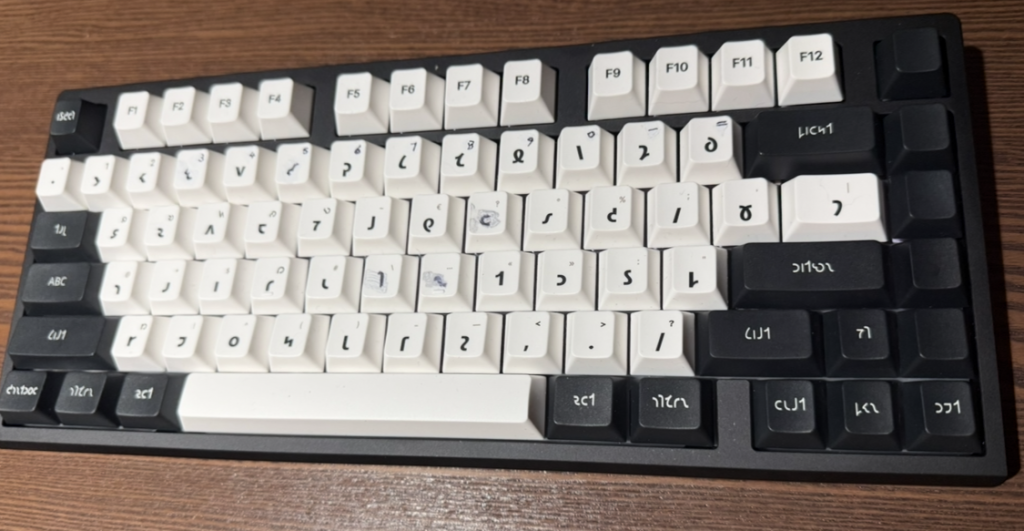
Aye have been finding myself wanting to read and right shavian at 𐑧𐑝𐑼𐑦 opportunity. Reading I have by now mastered: i’ve been transliterating e-books of novels, and forcing myself not to cave in and switch back to the orthodox orthography. Aye built myself a Safari 𐑐𐑤𐑳𐑜𐑦𐑯 to transliterate web-pages on the fly, called “Shave”, which works on both my laptop and my ·𐑲𐑐𐑨𐑛. My perseverance has paid off: my reading speed is by now approaching an acceptable pace, a speed at which I no longer get frustrated or tire out, and just want to push on turning pages in my page-turners.
The writing side I had been covering by journalling in shavian every day using pen and paper [well, Apple pencil and IPad, but that’s besides the point]. I love the tactile nature of handwriting, and the ease of writing it is arguably one of the main selling points of the alphabet in the first place. I now right by hand in shavian quicker then I was ever able to in latin orthography, by a comfy margin, too.
Feeling that I was fluent enough in both reading and writing by now, I wanted to start contributing to r/shavian more. But that’s when I started noticing that it wasn’t as much fun as I wanted it to be. Then it dawned on me that this was because I was no good at typing. I was hunting and pecking, and frustrated by my incompetence, and the fact that my keyboard layout of choice [Shaw imperial] was different on every device I used it on.
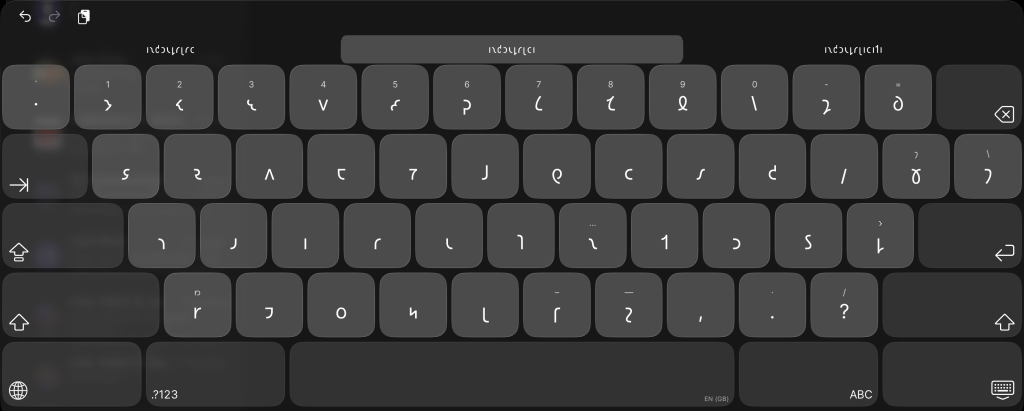
So I decided I would make my own. I would design my own version of the Shaw imperial layout, and I would make my own native IOS keyboard extension and my own Macos input-method. I did, and in fact, I’m typing on it on my IPad right now. It is a 100% native keyboard extension written in Swift. It has all the bells and whistles I wanted, and it is even using the Apple liquid glass look and feel. Yet I didn’t have to learn Swift or even write a single line of code: that was all taken care of by Claude code.
Which is utterly flabbergasting.
The rate at which artificial intelligence has evolved over the past year alone is ridiculous. Claude code in particular is utterly remarkable. It excels in its knowledge. In the hands of a competent software engineer, it is an incredible tool, but you have to keep a good eye on what it gets up to: left to its own devices, it writes horrific spaghetti code to fix problems that don’t exist. Yes, it hallucinates. In code this manifests itself as “over-enginering”. But sometimes the most delightful features are born this way, so don’t keep the leash too taught!
What was I talking about again? Oh yes! The layout I built with Claude is closer to the original Imperial good companion typewriter than the one on Shavian.Info. My one has the same number row as the type-writer, but as we have more space to work with – and an actual number “1” key, lol – I putt the ·𐑶 and ·𐑠 on their own keys when we have the space. In compact layouts–that is on the Iphone–they move to the original type writers layout: the ·𐑠 as shift+h, and the ·𐑶 as shift+d. I am still struggling a bit to find the right punctuation layout, but it is all starting to come together.
My overall guiding design principle here, is that I want to be able to type the entire alphabet without the need for a shift key. In order to accomplish this, I borrowed another feature of the original typewriter: typing the compound letters with two keystrokes, the two letters that make up the ligatures. So you type ·𐑩 then ·𐑮 to make ·𐑼, ·𐑘 then ·𐑵 to make ·𐑿, etc. This is the way I find myself spelling out words as I write by hand, and it feels really natural on a keyboard too. I wasn’t the first to implement this in a virtual keyboard though: a massive shout-out to Evan Gallagher, who built the mechanism into his ·JAFL keyboard layout, and to Haemoglobin, who independently had developed the exact same layout as myself, only taking it one step further and using the ·𐑻︀ [oeuvre] and ·𐑺︀ [yeah] vowels for forming the ·𐑻 and ·𐑺 compound letters, the exact same way Kingsley read did on the original typewriter. I shamelessly copied this into Shaw keys, and am loving it.
The other main design goal is to make sure that eye could rely on muscle memory when typing on my iPhone! The Shavian.Info layout is unfortunately different on every device you use it on. For a good reason, however: Shaw imperial takes up a lot of space! It would be 13 ½ keys wide if I made no concessions, and the keys would be way too small. To squeeze the keyboard onto my phone screen I again turned to the original typewriter for inspiration, and simply lopped off the keys that weren’t on the original typewriter. The one concession to make that work, is to move the ·𐑶 and ·𐑠 to the shift layer, as I mentioned earlier. The result is remarkably usable 12 key wide ·𐑲𐑴𐑧𐑕 keyboard–not as narrow as I had feared, at least not on my iPhone 17 pro.
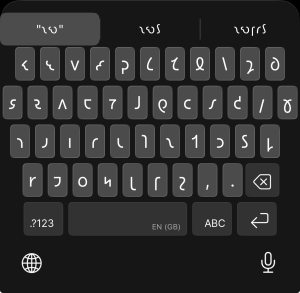
My [our? Sorry, Claude!] Keyboard extension is called Shaw keys, and I will try to get it up on the App Store in the not too distant future. In the meantime, you can try out the layout in my Shaw type typing practice app, or you can pick up Hemoglobin’s Keyman package on Discord in the resources channel.
-Joro
Leave a Reply